

Introduction
An application offers functionalities for both guest users and logged-in users. To access the features available to logged-in users, you need a valid access token. The authorization workflow automatically manages the distribution of this token to other dependent workflows.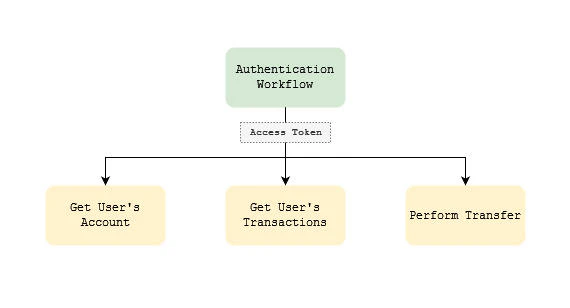
Prerequisites
- Login (authentication) API Specification
Steps
Follow these step-by-step instructions to complete the task:Step 1: Create a workflow
- Navigate to Workflow Library
Click on the “Workflow Library” menu item on the left-side main menu - Select a Library you want to add the Workflow
- Click on the “Create” button and enter a name for the workflow
Step 2: Add the API
- Click on the “Add Step” button
- Enter a name for the step
- Click on “Import API Spec”
- Select the API specification and Import
Step 3: Select the output
- Click on the “Output” button on the step
- Select the parameters you want to get as output of the workflow
Step 4: Save as Authentication Workflow
- Check the “Authentication Workflow” checkbox
- Click on the “Save” button
Tips and Troubleshooting
Additional Resources
- Testing workflows
- Adding workflows to the app
- Workflow data mapping